ParSeq
- GitHub:
- PyPI:


- License:

- Author:
Konstantin Klementiev (MAX IV Laboratory)


Package ParSeq is a python software library for Parallel execution of Sequential data analysis workflows. It implements a general analysis framework built around transformation nodes – intermediate steps in a data pipeline used for visualization, cross-data operations (e.g., averaging), user interaction and status reporting – and the transformations that connect these nodes.
ParSeq provides an adjustable data tree model that supports grouping, renaming, moving and drag-and-drop arrangement of datasets. It also includes customizable data format definitions, plotting tools for 1D, 2D, and 3D data, cross-data analysis routines and a flexible widget workspace suitable for both single- and multi-screen environments. ParSeq defines a structure for implementing specific analysis pipelines as lightweight Python packages.
ParSeq is primarily designed for synchrotron-based techniques, with a particular emphasis on spectroscopy.
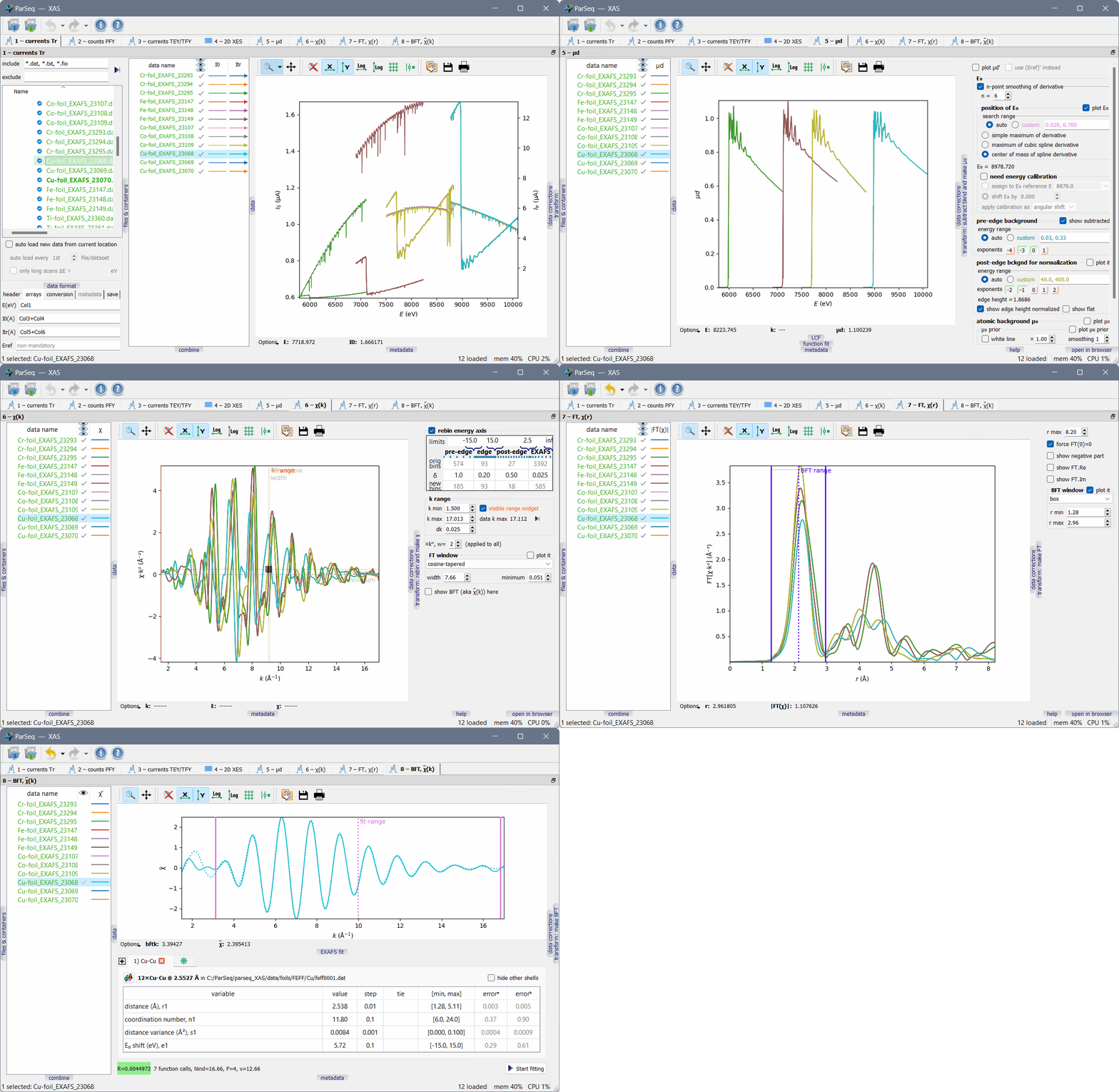
An example application is ParSeq-XAS, an EXAFS analysis pipeline, shown in the screenshot below:
Main features
ParSeq enables the creation of analysis pipelines as lightweight Python packages.
Flexible use of screen space through detachable and dockable transformation nodes (components of the analysis pipeline).
Two modes of applying GUI actions to multiple datasets: (a) simultaneous operations on multiple selected datasets, and (b) copying individual parameters or parameter groups from active datasets to subsequently selected datasets.
Undo and redo support for most data processing steps.
Ability to enter the analysis pipeline at any node, not only at its starting point.
Creation of cross-data combinations (including average, sum, RMS, classical PCA, cumulative PCA, Target Transformation and MCR-ALS), with downstream propagation alongside the parent data. Parent datasets can optionally be terminated at any selected downstream node.
General data correction routines for 1D data, including range deletion, scaling, spline replacement, spike removal, and jump correction.
Parallel execution of data transformations using either multiprocessing or multithreading (configurable by the pipeline application).
Optional curve-fitting solvers, also supporting parallel execution across multiple datasets.
Informative error handling, providing alerts and stack traceback with the type and location of errors.
Optional time profiling of the pipeline, controllable via a command-line option.
Export of workflows to project files, as well as data export to various formats, accompanied by Python scripts that visualize the exported data in publication-quality plots.
Support for container files (currently HDF5), which are represented as subfolders within the system file tree. The file tree, including containers, is lazy-loaded to efficiently handle large datasets.
Integrated web viewer widget for each analysis node, displaying help pages automatically generated from docstrings using Sphinx at startup.
The pipeline can be executed either through the GUI or via Python scripts (headless operation).
Optional automatic loading of new data during ongoing measurements.
The mechanisms for creating nodes, transformations, and curve-fitting solvers, as well as for connecting them and developing Qt widgets for transformations and curve fitting, are demonstrated in separately distributed packages:
Running without installation
Download the ZIP archives of ParSeq and a ParSeq pipeline from GitHub. Extract their contents (e.g., parseq and parseq_XES_scan folders) into the same suitable directory. Install the dependencies, then run the pipeline starter.
One advantage of this approach is that a single ParSeq installation can be shared across multiple Python environments.
Running with installation
Install py pip:
pip install parseqand e.g.pip install parseq-XAS.Alternatively, install from unzipped GitHub sources. Navigate to the directories containing pyproject.toml and run:
python -m pip install ..
After installation, pipeline starters can be executed directly from the command
line, for example: parseq-XAS.
Launch an example
Run the *_start.py module of a pipeline. If ParSeq and the corresponding pipeline are installed (rather than simply unpacked), these starters are also available as command-line commands.
You can invoke them with the --help option to explore the available
parameters. A common usage pattern is to load a project (.pspj) file either
from the GUI or directly via the command line at startup.
Documentation
The documentation is available online on Read the Docs.
Hosting and contact
The ParSeq project is hosted on GitHub. For support or to report issues, please use the repository’s Issues section.
Citing ParSeq
Please cite ParSeq as: K Klementiev, “ParSeq: Python software for comparative data analysis pipelines”, J. Phys.: Conf. Ser. 3010 (2025) 012126; doi:10.1088/1742-6596/3010/1/012126.
User’s Guide
- Create analysis pipeline
- Centralized facilities
- Nodes and transformations
- Docked node widgets
- Undo and redo
- File tree views and file formats
- Metadata
- Plots
- Fits
- Cross-data combinations
- Standard data corrections
- Project saving with data export and plot script generation
- Error handling
- Command-line interface and start options
- Performance profiling
- Help system
- About dialog
- Prepare pipeline metadata and images
- Make data nodes
- Make data transformations
- Make GUI widgets
- Make fitting worker classes
- Make data pipeline
- Create test data tree
- Create pipeline starter
- Creating development versions of analysis application
- Centralized facilities
- Data nodes
- Data model
- Data transformations
- User transformation widgets
- Data corrections
- Data correction widgets
- Data combinations
- Data combination widget
- Fitting workers
- Fit widgets
- The MIT License